Code CAD for laser cutting · runs in the browser · free and open source
I make a lot of things on my laser cutter, and for years the workflow has been Inkscape plus a Python plugin to generate the finger joints. It works, but it’s fiddly. Every design is a pile of shapes I nudged by hand, and when a sheet of “3 mm” plywood turns out to be 3.2 mm, I start nudging all over again. So I built something better: Kerf.
Try Kerf in your browser · Source on GitHub
OpenSCAD, but flat
If you’ve used OpenSCAD, Kerf will feel familiar. You don’t draw a design, you write it: squares, circles, polygons and text, combined with union and difference, wrapped in modules you can reuse. The difference is that everything is built around flat parts. You declare a material with its thickness and kerf, wrap 2D geometry in a part(), and that part becomes one piece of plywood or acrylic.
Because the design is a program, changing the thickness is one number. Every finger joint, slot and tab follows.
Test-fit before you burn anything
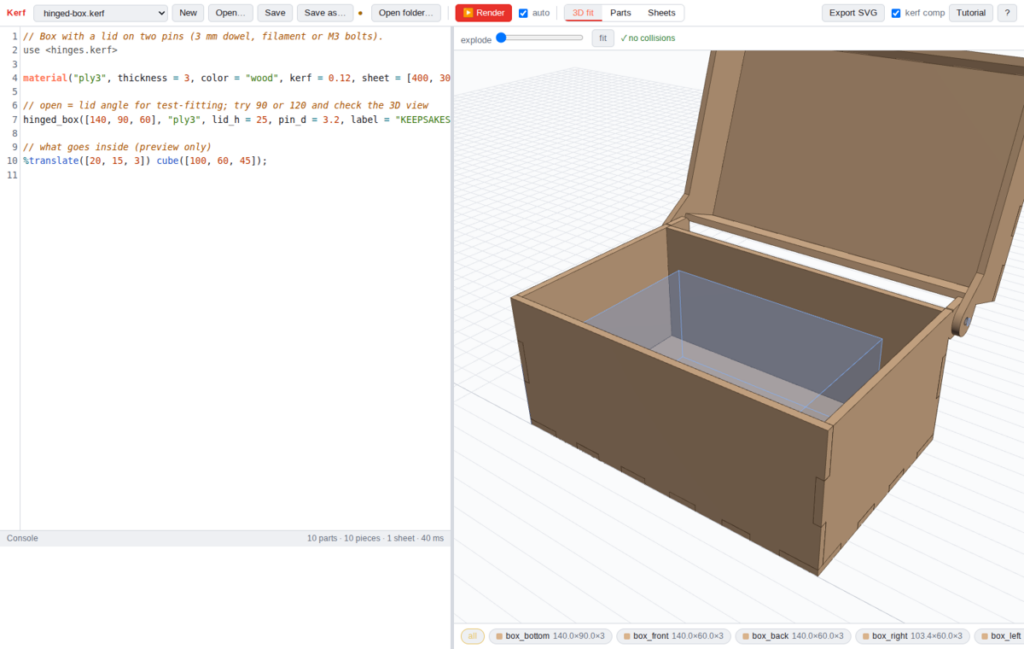
Parts are placed in 3D with ordinary transforms, so you can see the whole assembly before cutting it. Kerf checks every pair of parts for overlap and marks collisions in red. You can also add a ghost reference object, like the thing that’s supposed to go inside the box, and check that it clears. Flip one finger joint the wrong way and the fit check tells you immediately, instead of after you’ve cut the panel.
Straight to the laser
When the assembly fits, Kerf packs the parts onto sheets of each material and exports one SVG per sheet, in millimetres. Cuts are red, scores are blue and engraving is black fill. Bitmaps for photo engraving come along too. That’s exactly what xTool Creative Space wants: import the SVG and give each colour its own power, speed and passes. Kerf can also compensate for the beam width on export, so a 20 mm square comes out 20 mm.
Boxes, hinges and gears
Kerf ships with libraries written in the Kerf language itself:
- Boxes: one line of
finger_box()with three dimensions and a material gives a complete finger-jointed box, open, closed or with a lift-off lid, every panel already placed in 3D. - Hinges: a box whose lid swings on two pins. An
opensetting rotates the lid in the preview, so you can check it clears everything at 110°. There’s also a calculator for how long a living hinge needs to be for a given bend. - Gears: involute spur gears, with a function that gives the exact centre distance for any pair. Your axle holes land in the right place, and the fit check catches teeth that are too tight.
Website, desktop app, or both
Kerf runs entirely in the browser; nothing is uploaded to a server. Open a design from your disk, edit it, and save it back. There’s also a desktop app for Linux (an AppImage) with native Open and Save dialogs, and access to all your installed fonts. Both include a 13-lesson tutorial that goes from your first square to a kerf test card, parametric boxes, hinges and gears.
Open source
Kerf is free software. The app is under the AGPL, so improvements stay open. The libraries, examples and tutorial are MIT, so anything you design with them is yours to share or sell however you like. I built it with Claude Code, Anthropic’s AI coding assistant, which wrote the code while I steered the design.
Next on my list is bending living hinges in the 3D preview, so a wrapped corner can be test-fitted like everything else. Meanwhile, if you have a laser and you’ve ever cursed a finger joint, give Kerf a try.