Mixed-reality toy · Meta Quest 3 (and 2) · a few minutes, or as long as you like
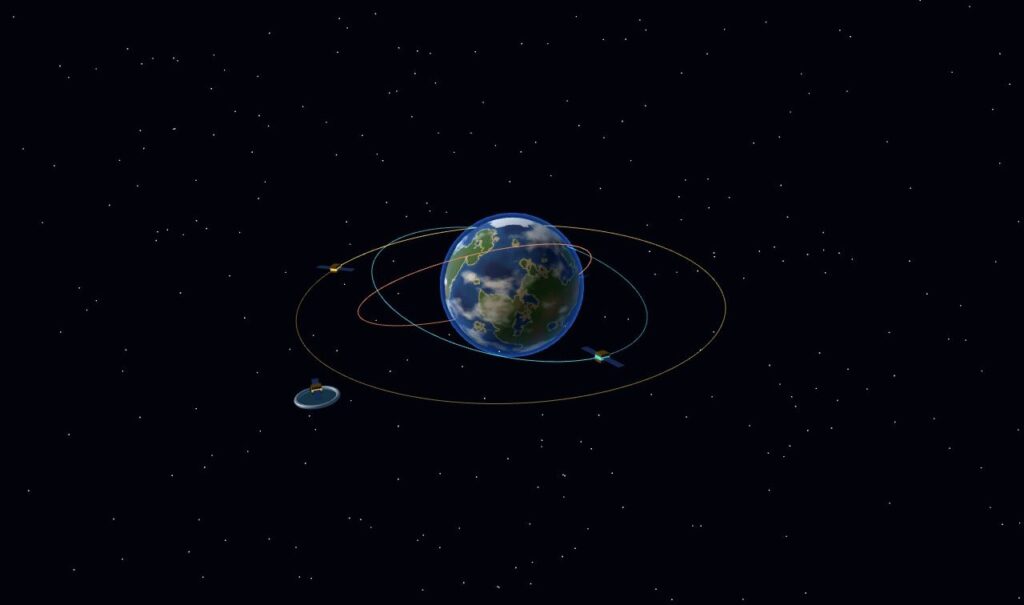
A planet the size of a grapefruit hangs over your desk, with clouds and little continents, slowly turning. Beside it sits a cradle holding a satellite. Pick the satellite up and a dotted line appears, showing exactly where it would go if you let go right now. Toss it sideways at the right speed and it goes round and round the planet, a few centimetres above your keyboard.
Play Pocket Planet (or walk through the purple portal in the VR lobby)
Orbits you can throw
Orbits are hard to get a feel for because the real ones are enormous and slow. So this planet’s gravity is turned up until a desk-sized orbit takes a gentle hand toss: about one metre a second sideways, thirty centimetres from the planet, and the satellite comes back round in about two seconds. Throw a little slower and it spirals down and crashes, leaving a ring where it hit. A bit faster than about 1.4 m/s and it escapes for good.
The dotted line is the whole point. While you hold a satellite it changes colour: teal means it will orbit, red means it will fall in, amber means it will fly away. A label beside it gives the lowest and highest point of the orbit, how long one lap takes, how fast your hand is going, and how fast a circular orbit at that height would be. You can feel your way into a perfect circle, or deliberately throw a long, skinny ellipse that swoops close to the surface and drifts far out.
The preview is the flight
Each satellite is treated as massless next to the planet, so it follows a perfect two-body orbit, the kind Kepler described. The game steps the motion 480 times a second with a method that keeps orbits from slowly drifting outward or inward over many laps (energy stays within a few thousandths of a percent over three orbits). The preview line runs exactly the same steps, so it isn’t an approximation of where the satellite goes. It is where it goes.
The fiddly part turned out to be the throw, not the orbit. When you open your hand to let go, the headset sees your fingers open a moment late, and your hand is already slowing down by then. So the release speed is a straight-line fit over the last tenth of a second of your hand’s path, ending a little before the release was noticed. With controllers the button press is instant and needs much less of that correction.
Moving the whole system
Grab the planet itself and the whole system comes with it, satellites still circling, so you can bring it closer or put it on a shelf. You can pluck a satellite out of its orbit and throw it again. The menu (palm towards your face, or Y) slows time down to a quarter or speeds it up four times, turns the orbit lines on and off, clears everything, and swaps the planet for a dense dwarf world or a gas giant with much stronger pull.
On a Quest 3 it all floats in your real room in colour passthrough. On a Quest 2 the room is grey, and with no passthrough at all you get the planet in a field of stars.
Just a sandbox, for now
There are no levels and no score. It’s a toy for getting orbits into your hands. Ideas for later: little challenges (put a satellite in a circular orbit, keep one above a certain city, slingshot past a moon, meet up with another satellite), and setting the planet down on a real table the way the Goldberg game does.